Showing posts with label Visual Studio. Show all posts

Monday, July 25, 2011

Getting Started with the AmplifyJS NuGet Package in Visual Studio

Last week I packaged appendTo's AmplifyJS Library and published it to the central NuGet server for use in your Visual Studio projects.

The package contains...
  • An unminifed version of AmplifyJS for development use
  • A minified version of AmplifyJS for production use
  • A VSDOC version of AmplifyJS that enables intellisense support within Visual Studio

What is AmplifyJS?


In case you aren't familiar with what AmplifyJS is, here is an excerpt from the website...
AmplifyJS is a set of components designed to solve common web application problems with a simplistic API. AmplifyJS solves the following problems:

  • Ajax Request Management
    • amplify.request provides a clean and elegant request abstraction for all types of data, even allowing for transformation prior to consumption.


Installation


In order to install the NuGet package in your Visual Studio project all you need to do is type the following command into the "Package Manager Console"


Once you type the above command into the "Package Manager Console" then all of the appropriate files will be downloaded to your project to support AmplifyJS.


If the command line isn't your thing and you prefer a Graphical User Interface, then you can install AmplifyJS as well by searching for "AmplifyJS" in the "Add Library Package Reference" dialog.


Referencing and Using AmplifyJS


Now that you've installed AmplifyJS all that is left is to reference the script file that was added to your Scripts folder and start using it. It is considered best practice to add your scripts to the bottom of your webpage for best overall performance. Once you do this you can start using the library right away as shown in the following code snippet.
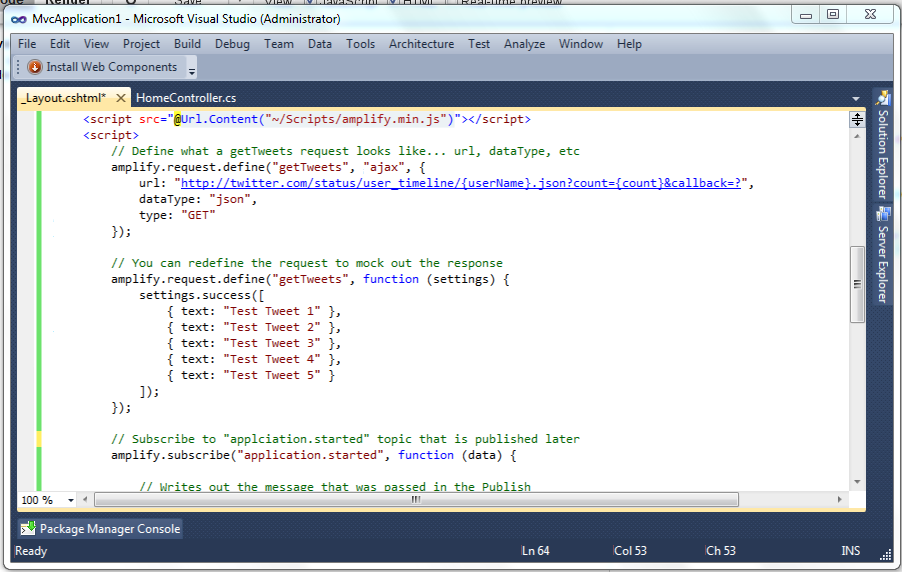

The code that I am showing the above screenshot is a very simple example of what can be accomplished with AmplifyJS. Look at the following code and see how the 3 components work together (Publish/Subscript, Request, and Store).


You can play around with the above code inside the following jsFiddle. Click the "+" sign to launch a full editor so you can tweak with the code yourself. Try commenting out the 2nd definition of the mocked "getTweets" request. You should see real data from Twitter being returned instead of mock data.


If are interested to see how AmplifyJS might help your application then you might check out an article entitled Extending Your jQuery Application with AmpilfyJS that is hosted on Microsof't's Script Junkie website.

There is so much more you can do with the AmplifyJS library. Feel free to check out the official AmplifyJS Documentation and if you need support or more information check out the AmplifyJS Community page.

Friday, July 24, 2009

Registering Custom HttpModule in IIS7 Web.config

I’ve been writing an Error Hander HttpModule for a current ASP.NET WebForm project and things were going well until my last merge with TFS. All of a sudden, my HttpModule wouldn’t register anymore.

For the life of me I couldn't’ figure out what had changed. I spent half the day trying to figure out what in the world was going on.

Here is the chain of events that I tried before finding the actual solution. If you want, you can just skip to the end to find the answer :)

First, I decided to strongly sign the assembly with the HttpModule (even thought it wasn’t necessary previously)…

So, I created a new Strong Name Key from the properties window of my HttpModule project from Visual Studio 2008

CreateKey

Then, in order for me to get the Public Key Token to decorate the HttpModule entry in the web.config, I used the following command line tool
sn –T ErrorFramework.dll

Note: You might consider integrating this command into a Get Public Key Token External Tool in Visual Studio 2008.

Here is what my original web.config entry looked like before:

<add name="ExceptionModule" type="ErrorFramework.ExceptionModule, ErrorFramework" /> 

and after all of the above steps I was able to update my web.config to the following:

<add name="ExceptionModule" type="ErrorFramework.ExceptionModule, ErrorFramework, Version=1.0.0.0, Culture=neutral, PublicKeyToken=7125b1d9a03db888" />      

However, to my dismay the HttpModule still did not register!

Secondly, I tried dynamically registering my HttpModule in the Global.asax instead of relying upon the web.config.

namespace ErrorFramework
{
    public class Global : System.Web.HttpApplication
    {
        public static ExceptionModule errorModule = new ExceptionModule();

        public override void Init()
        {
            base.Init();
            exceptionModule.Init(this);
        }
    }
}

This thankfully worked fine, but I really wanted the web.config option to work so that I could add or remove the HttpModule at will without having to change and recompile code.

Thirdly, I decided to use Visual Studio’s internal webserver (Cassini).

To my surprise the HttpModule started to work again! Although, I was excited that it worked… I was also very confused because I thought it should work through IIS7 as well. So, back to the drawing board.

Fourthly, I finally found the answer I was looking for.

Apparently, IIS7 looks in the system.webSever/modules section of the web.config and not in the system.web/httpModules section like IIS5 & IIS6. It turns out that the web.config that our project has both sections defined in the config file!

So, instead of this…

<system.web>
    <!-- Misc XML -->
    <httpModules>
        <add name="ExceptionModule" type="ErrorFramework.ExceptionModule, SG.SSP.Darwin.WebPortalFramework, Version=1.0.0.0, Culture=neutral, PublicKeyToken=7125b1d9a03db888" />      
    </httpModules>
    <!-- Misc XML -->
</system.web>

I needed to do this…

<system.webServer>
    <!-- Misc XML --> 
    <modules> 
        <add name="ExceptionModule" type="ErrorFramework.ExceptionModule, SG.SSP.Darwin.WebPortalFramework, Version=1.0.0.0, Culture=neutral, PublicKeyToken=7125b1d9a03db888" /> 
    </modules>
    <!-- Misc XML --> 
</system.webServer>

Note: If you want it to work both on IIS7 and through Cassini, then you’ll need to define it in both places ;)

Wednesday, January 10, 2007

Resource Refactoring Tool

By default, Visual Studio has a way to localize the text in a ASP.NET page, but there is no tool for extracting the text from the code behind or app_code files, until now!

There is a great new program, The Resource Refactoring Tool, that helps you localize your .NET applictions.

Most recently, they have added support for localizing the code behind files in a Web Applications... which is what I have been waiting for.

I installed and tested the tool and it is has been very handy.

Saturday, September 09, 2006

CSS Adapaters Beta 2

For those of you who would like more control of your HTML output from ASP.NET 2.0, then check out the newly updated CSS Adapters Beta 2.

At one point I looked into using "CSS Adapters Beta 1" because the native asp:Menu HTML output does not work well with all browsers ( mainly Safari ). However, my direction was altered in another direction that didn't need the asp:Menu control, so Safari compatibility with the menu was no longer an issue.

Anyway, I know there are some hardcore CSS gurus who will do anything they can to not use tables for non-tabular data. If that describes you, or if you'd just like a little more control of your HTML output, then check out the CSS Adapters Beta 2.

Wednesday, August 23, 2006

VS 2005 Debugging Visualizers

A new feature of Visual Studio 2005 is the introduction of Debugger Visualizers. They offer an advanced, customized data display while you are running your application under the Visual Studio Debugger.

Here is a list of Debugger Visualizers that I have found...
If you are interested in developing your own Debugger Visualizer, then here are some tips.

Monday, August 21, 2006

VS 2005 Shortcuts

A college of mine asked me if I knew the shortcut for getting the matching brace/bracket/parethesis in Visual Studio 2005. I didn't know, so in my search for the answer I ran across a useful page with lots of useful Shortcuts for Visual Studio 2005.

By the way, the shortcut for matching a brace/bracket/parethesis is “Ctrl-]”.

Tuesday, August 08, 2006

VS 2005 Code Snippets

For those of you who don’t know about snippets or who are sad that c# didn’t come with many snippets installed, here is a List of Microsoft Snippets that you can install.

Once installed (double-clicking vsi files) you can access the snippets either by typing in their shortcut name and hitting tab twice or by clicking Ctrl-K-S.

I made a custom SOAP snippet using Snippy to call a Web Service method from ASP.NET. To import my snippet use “Tools->Code Snippet Manager…->Import”. My snippet's shortcut is “soap”.

In addition, GotCodeSnippets.NET, has a lot of other snippets submitted by the .NET community.

Friday, June 23, 2006

VS.NET 2005 Spell Checker Addin

My boss found a misspelling on our website yesterday.

So, I thought I'd look around for a Visual Studio.NET 2005 spell checker addin.

I found the following tools... Spell Checker for VS.NET 2005 Version 1.0 Add-in by Dean J. Giovanelli and Spell Checker for HTML and ASP.NET pages by Mikhail Arkhipov

The tools have a lot of settings so they don't spell check things you aren't concerned about.

Using one of the above tools I was able to find the spelling mistake and correct it. I hope you find the above tools useful as well.