Showing posts with label AmplifyJS. Show all posts

Wednesday, May 15, 2013

Testing and Prototyping JavaScript Applications


I'm pleased to announce that I've finished my first course for Pluralsight entitled Front-End First: Testing and Prototyping JavaScript Apps.

Years ago it was common for the back-end to have code coverage, but having unit tests for client-side JavaScript was difficult, cumbersome, and rare. Thankfully, today that is no longer the case. By using various tools and libraries such as Mocha, Sinon.js, and GruntJS you can easily provide code coverage for your front-end as well.

Historically a front-end developer had to wait until the back-end was complete before they could start truly building a functional User Interface. Thankfully today there are libraries such as Mockjax, AmplifyJS, and mockJSON that can enable you to simulate the interactions with the back-end before its even complete. By doing so, this enables a front-end developer to work independently from the back-end and allows both teams to efficiently work within their speciality.


Monday, October 08, 2012

Adding jQuery Deferred Support to AmplifyJS Request

A common feature request in the AmplifyJS Google Group is for the request component to support jQuery Deferreds.

For a brief overview of the request component you can check out a post I recently titled Mocking jQuery AJAX with AmplifyJS Request. In addition there are many more features listed in the official documentation.

A Little History of the Library


Before I address that request, let me go into a little history about the AmplifyJS library. When AmplifyJS was announced there was a conscious decision to not have a hard dependency on jQuery and to make it library agnostic so that you could use Dojo, MooTools, YUI, or something else. So, the publish/subscribe and store components do not use jQuery at all. The default request type shipped with AmplifyJS does utilize jQuery AJAX, but you can just as easily create a new request type that uses Dojo, MooTools, etc.

3 Ways to Provide jQuery Deferred Support


Now that we have some of the history out of the way, let's get back to the feature request. Adding a tight dependency to jQuery's Deferreds implementation isn't in the AmplifyJS roadmap since it was written to be library agnostic. You can however, write your code such that the request component plays well with jQuery Deferreds if you so choose.

1. Manually Wiring Up Deferreds


Back in October 2011 Eric Strathmeyer (@strathmeyer) answered a Google Group post regarding adding jQuery Deferreds support to amplify.requst. On of his suggestions was to manually wire up the amplify.request with jQuery Deferreds for both the success and error callbacks as shown below.


2. Using a Helper Function


If you find yourself wanting to use jQuery Deferres often with amplify.request then you can use the following helper method that both Eric and Scott González (@scott_gonzalez) have recommended.


3. Using the amplify-request-deferred Plugin


I thought some developers might want a syntax that looked more native when using jQuery Deferreds with amplify.request, so I went ahead and made the amplify-request-deferred plugin, base on the above work by Eric and Scott. To get started all you have to do is to include the plugin immediately after amplify.request.


Once you have the plugin included on your page, then you can use the plugin with syntax like the following...


Conclusion


Hopefully one of these solutions is sufficient for your needs. This is a very common request, but as I mentioned in the history section above the AmplifyJS library would rather be agnostic and not depend on any one library. I hope this is helpful to you. Thanks.

Wednesday, October 03, 2012

Mocking jQuery AJAX with AmplifyJS Request

In my opinion the most powerful part of the AmplifyJS library is the request component. The documentation is nice, but I wanted to highlight the mocking piece in particular because it is very powerful, but is easy to miss.

Being able to separate what a request looks like from the actual request itself proves to be a very effective way to develop. It protects yourself from future changes to the request/response handshake and also makes it really easy to mock responses for unit testing or for rapid prototypes.

Standard Request Define and Request Usage


The following snippet of code defines what a request should look like that communicates to twitter to get someone's recent tweets.


When you want to use the definition above you just reference the resourceId that you provided ("getTweets"), you pass any data you want to pass along, and give a callback function that will be invoked when the response comes back.


Easily Mocking the Request


If for some reason you don't have internet access, the service you are using is unstable, or you just need to unit test some code then you can mock the response by redefining the resourceId and using a function as the 2nd parameter that will be used for the mock.


Using mockJSON to Generate Randomized Data


If you are anything like me, then you are awful at making sample data. I end up with something like "Test 1", "Test 2", etc... which is laborious, looks silly, and doesn't really exercise your UI at all. If you want to semi-randomize your data for prototyping then using the mockJSON library can be helpful. The following code says to generate an array of 20 to 30 tweets that follow the format specified.

The mockJSON library, written by Menno van Slooten (@mennovanslooten), I am using has been beneficial to me when building prototypes when the backend is either unstable or not developed yet.


The following screenshot is an example of what one of the above objects looks like after using mockJSON. As you can see, the object can almost pass as a legitimate tweet (minus the actual tweet.text). mockJSON allow you to create custom keywords to extend the native ones like @MALE_FIRST_NAME, so you could conceivably make a new keyword that can make a more believable tweet.text.


If you defined the same resourceId multiple times, then the last one defined wins. So, the following output is from the mocked version using mockJSON to semi-randomize the twitter response. Note: If I wanted to switch to the real twitter, I would just need to comment out my mocked versions.


I just scratched the surface of what you can do with AmplifyJS Request. It can support caching, decoders, dataMaps, custom request types, and more. Check out the documentation for more details.

Wednesday, April 04, 2012

Orlando Code Camp JavaScript Sessions

I was honored to be asked by Esteban Garcia (@EstebanFGarcia) to speak at the Orlando Code Camp on March 31, 2012.

I was impressed that there were 13 simultaneous tracks that were running all day long! One of the tracks was JavaScript and that is where I stayed pretty much stayed.
I presented 2 sessions Extending Your jQuery Application with AmplifyJS and Find Common jQuery Bugs. You can find the slides for these presentations online:

  • Extending Your jQuery Application with AmplifyJS - This session takes an existing web application and slow enhances it with with the 3 components of AmplifyJS. I introduce the observer pattern using amplify.publish/amplify.subscribe, I show how to use the amplify.store to support HTML5 persistant storage that is cross-browser, and I show amplify.request which is a high level abstraction to $.ajax that provides ease of configuration, mocking, prototyping, and hooks to protect against future changes.
  • Find Common jQuery Bugs - jQuery is so easy to use and thankfully abstracts many of the cross-browser concerns we used to labor over years ago. However, as with any library there are a common set of bugs that tend to crop up the more you use it. This session aims to help equip developers with the appropriate knowledge and tools to exterminate many common bugs seen in jQuery code. For each topic that is covered we will start with a piece of code that has a jQuery bug, then identify what the bug is, explain why it is happening, and then proceed to explore various techniques to exterminate the bug.

Kevin Griffin (@1kevgriff) started the day with a beginner "Zero to Hero in jQuery" talk. Even though jQuery has been around for years, it still can pack a room! Kevin had a lot of question from the audience and engaged them well.

John Papa (@john_papa) was the keynote speaker and gave an overview on the state of the web. He gave a good high level view of the technologies that are used today in modern front-end applications. John also gave the following 2 JavaScript presentations that were standing room only:

In addition John has done an in-depth Pluralsight series on Knockout and he is currently working on a series for JsRender that should be available May 2012.

There was a large crown of attendees at the conference. I heard that over 750 people signed-up to attend. That is extremely impressive and the conference was FREE too! It takes a lot of hard work, determination, and donations from generous sponsors to have something like that succeed. I want to thank Esteban Garcia and his team for the great job that they did.

Monday, July 25, 2011

Getting Started with the AmplifyJS NuGet Package in Visual Studio

Last week I packaged appendTo's AmplifyJS Library and published it to the central NuGet server for use in your Visual Studio projects.

The package contains...
  • An unminifed version of AmplifyJS for development use
  • A minified version of AmplifyJS for production use
  • A VSDOC version of AmplifyJS that enables intellisense support within Visual Studio

What is AmplifyJS?


In case you aren't familiar with what AmplifyJS is, here is an excerpt from the website...
AmplifyJS is a set of components designed to solve common web application problems with a simplistic API. AmplifyJS solves the following problems:

  • Ajax Request Management
    • amplify.request provides a clean and elegant request abstraction for all types of data, even allowing for transformation prior to consumption.


Installation


In order to install the NuGet package in your Visual Studio project all you need to do is type the following command into the "Package Manager Console"


Once you type the above command into the "Package Manager Console" then all of the appropriate files will be downloaded to your project to support AmplifyJS.


If the command line isn't your thing and you prefer a Graphical User Interface, then you can install AmplifyJS as well by searching for "AmplifyJS" in the "Add Library Package Reference" dialog.


Referencing and Using AmplifyJS


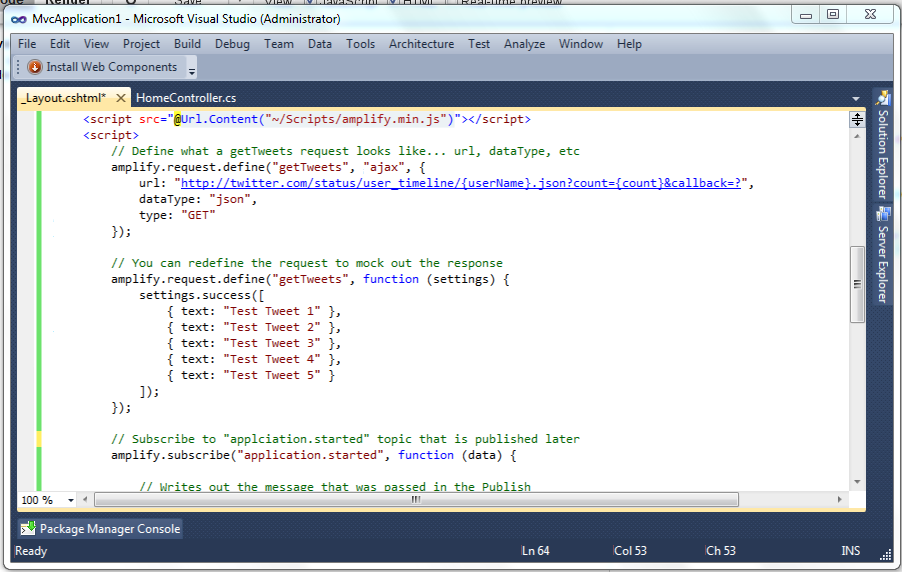
Now that you've installed AmplifyJS all that is left is to reference the script file that was added to your Scripts folder and start using it. It is considered best practice to add your scripts to the bottom of your webpage for best overall performance. Once you do this you can start using the library right away as shown in the following code snippet.


The code that I am showing the above screenshot is a very simple example of what can be accomplished with AmplifyJS. Look at the following code and see how the 3 components work together (Publish/Subscript, Request, and Store).


You can play around with the above code inside the following jsFiddle. Click the "+" sign to launch a full editor so you can tweak with the code yourself. Try commenting out the 2nd definition of the mocked "getTweets" request. You should see real data from Twitter being returned instead of mock data.


If are interested to see how AmplifyJS might help your application then you might check out an article entitled Extending Your jQuery Application with AmpilfyJS that is hosted on Microsof't's Script Junkie website.

There is so much more you can do with the AmplifyJS library. Feel free to check out the official AmplifyJS Documentation and if you need support or more information check out the AmplifyJS Community page.